
How to Connect Laptops, Teams, or Streaming to a Big Screen TV at Conferences
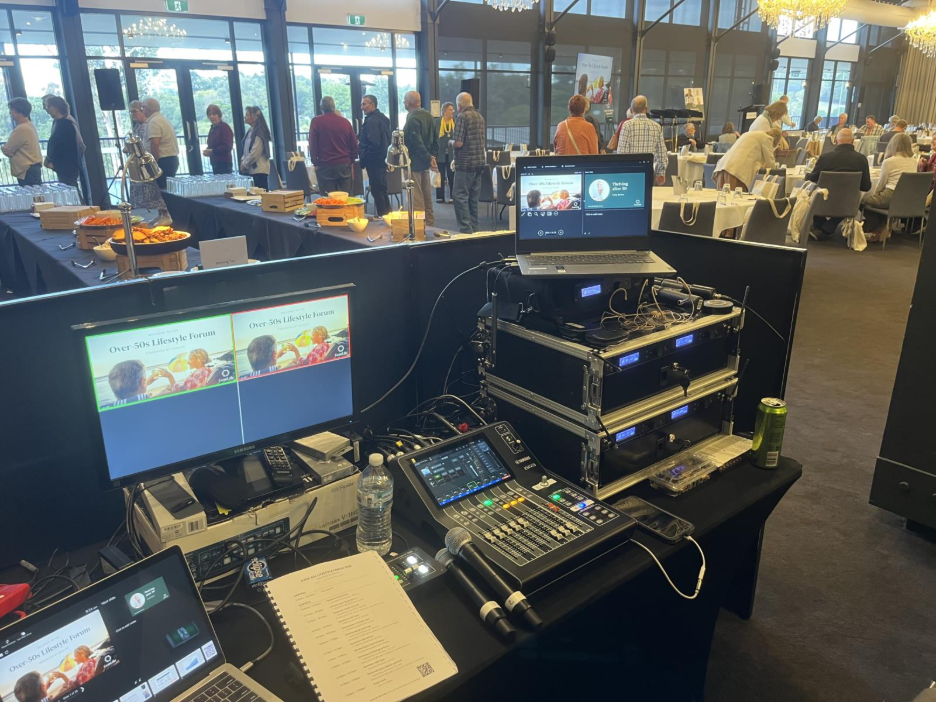
Connecting laptops, Microsoft Teams, or live streaming platforms to a Big Screen TV at conferences can significantly enhance audience engagement and overall experience. Whether your goal is to display presentations, share video content, or run live feeds, understanding the best practices and tools ensures smooth connectivity and high-quality visuals. For organizations hosting conferences in Brisbane, using the right technology, such as event TVs or LED video walls, can transform how information is shared and received. Sublime AV provides expert services to ensure seamless integration for events of any scale.
Why Big Screen TVs and LED Video Walls Are Ideal for Conferences
When hosting professional conferences, the visual quality of the content plays a critical role in audience retention. Big Screen TVs and LED video walls offer multiple advantages over traditional projection methods. These displays provide higher brightness, sharper images, and wider viewing angles, making them ideal for corporate environments. Unlike older technologies, these setups can handle complex presentations, high-definition video, and interactive content without compromise.
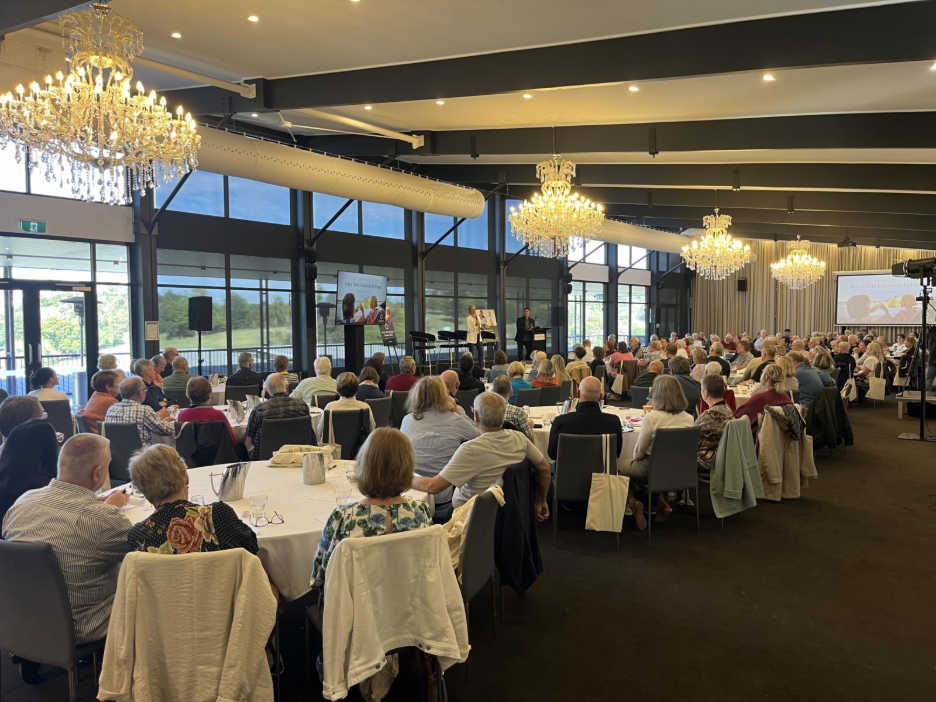
Using event TV Brisbane ensures that every attendee can see content clearly, regardless of their location in the room. Additionally, LED video walls provide flexible display sizes, allowing organizers to scale the presentation to suit small meeting rooms or large auditoriums. Partnering with professional services, like those offered by Sublime AV, ensures technical reliability and reduces the risk of connection issues during critical sessions.
Common Devices and Platforms for Conference Connectivity
Modern conferences often require connecting multiple devices and platforms to Big Screen TVs. Common use cases include:
Laptops: Most presenters prefer using laptops to manage slides, videos, or interactive content. Connecting a laptop to a Big Screen TV can be done via HDMI, USB-C, or wireless solutions, depending on compatibility.
Microsoft Teams: Virtual collaboration tools like Teams are increasingly popular for hybrid conferences. Integrating Teams with a large display allows in-room attendees to interact with remote participants effectively.
Streaming Platforms: Live streaming services, webinars, and recorded content can be broadcast directly onto Big Screen TVs or LED video walls for large audiences.
Ensuring seamless operation often requires professional setup and testing. By leveraging Sublime AV services, event organizers can confirm device compatibility, secure stable connections, and provide staff with support during presentations.
Step-by-Step Guide to Connecting a Laptop to a Big Screen TV
Connecting a laptop to a Big Screen TV may seem straightforward, but following the correct procedure ensures stability and optimal performance. Here’s a detailed step-by-step guide:
Identify Compatible Ports: Most modern TVs support HDMI connections, while some may offer DisplayPort or USB-C. Verify which ports your laptop and TV support.
Use High-Quality Cables: Poor-quality cables can lead to signal degradation or flickering screens. Investing in reliable HDMI or USB-C cables is essential.
Adjust Display Settings: After connecting, adjust the laptop’s display settings to match the TV’s resolution. For example, 1080p or 4K ensures the clearest visuals.
Check Audio Output: Many Big Screen TVs can transmit audio directly. Verify that the laptop is set to output sound through the connected display.
Test Before the Event: Always run a test connection prior to the conference to ensure compatibility and troubleshoot potential issues.
Using these practices with event TV Brisbane services ensures a smooth experience, avoiding technical disruptions during live presentations.
Integrating Microsoft Teams with Big Screen TVs
Hybrid conferences often require connecting Microsoft Teams to a Big Screen TV to enable participation from remote attendees. Here’s how this can be done effectively:
Direct Connection via Laptop: Connect your laptop running Teams to the TV using HDMI or wireless solutions. This allows both in-room and virtual participants to view the content.
Dedicated Video Conferencing Systems: Some setups use integrated systems that directly link Teams with display hardware. These solutions provide higher reliability and can handle multiple participants simultaneously.
Audio Management: Ensure microphones and speakers are properly connected to avoid feedback and maintain clear communication.
Professional support, such as that from Sublime AV, can assist in optimizing the Teams integration for smooth conferencing and high-quality visual output.
Streaming Content to Big Screen TVs at Conferences
Streaming live or pre-recorded content during conferences requires careful planning and technical precision. Big Screen TVs and LED video walls are ideal for displaying streaming content due to their high resolution and brightness. Key considerations include:
Stable Internet Connection: Ensure a reliable, high-speed connection to prevent buffering or lag.
Compatible Streaming Devices: Depending on the platform, you may use laptops, media players, or streaming boxes to deliver content to the display.
Display Calibration: Adjust brightness, color, and screen layout for optimal viewing in conference settings.
Backup Plan: Always have a backup device or alternative display method in case of technical issues.
With professional services from Sublime AV, event organizers can implement a seamless streaming experience, ensuring uninterrupted content delivery on large displays.
Choosing the Right Big Screen TV or LED Video Wall
Selecting the correct display depends on room size, audience distance, and content type. Here are some tips:
Screen Size: Larger screens or multi-panel LED video walls are necessary for large venues to maintain visibility.
Resolution: Higher resolution ensures clarity, especially when displaying detailed slides or high-definition videos.
Brightness and Viewing Angle: Choose displays with high brightness for rooms with ambient light, and ensure wide viewing angles for audience members at various positions.
Flexibility and Setup: Modular LED video walls allow flexible configurations for unconventional venues.
For Brisbane conferences, event TV Brisbane solutions provided by Sublime AV can be tailored to meet these specifications, ensuring professional-quality displays.
Benefits of Using LED Video Walls Over Traditional TVs
LED video walls offer several advantages over single-panel TVs, especially for larger conferences:
Scalability: Easily expand or reduce the screen size to fit the venue.
Seamless Multi-Panel Displays: Provide uninterrupted visuals across multiple screens.
Enhanced Brightness and Color: Ideal for rooms with high ambient lighting.
Durability: Designed for extended operation without overheating or performance degradation.
These benefits make LED video walls a preferred choice for professional events in Brisbane, where quality and reliability are paramount. Sublime AV specializes in delivering these setups for conferences, ensuring precise installation and calibration.
Troubleshooting Common Connectivity Issues
Even with the right equipment, technical challenges can arise. Common issues and solutions include:
No Signal on the TV: Ensure the correct input source is selected and cables are securely connected.
Audio Problems: Check that the laptop or Teams settings are configured to use the TV as an audio output device.
Wireless Connection Lag: Minimize interference by positioning devices closer to the router or using a wired connection.
Compatibility Errors: Verify that software versions and device drivers are up to date.
Partnering with Sublime AV provides access to experts who can quickly resolve these issues, ensuring a smooth conference experience.
Comparison of Connection Methods
|
Connection Type |
Pros |
Cons |
Best Use Case |
| HDMI Cable | Stable, high-quality video & audio | Limited mobility | Single laptop presentations |
| USB-C | Supports video, audio, and power | May require adapters | Modern laptops with USB-C |
| Wireless (Miracast/Chromecast) | No cables, flexible placement | Potential lag, dependent on network | Remote collaboration or casual streaming |
| Dedicated Video Conferencing Systems | High reliability, integrated audio/video | Higher cost | Hybrid conferences using Teams or Zoom |
FAQ Section
-
Yes, you can switch between multiple laptops using HDMI switchers or input selectors. For larger venues, LED video walls allow multiple sources to display simultaneously.
-
Wireless connections are convenient but can experience lag or interference. A wired HDMI or USB-C connection is recommended for critical presentations.
-
Absolutely. Ensure a stable internet connection and compatible streaming devices. Professional setup services, like Sublime AV, can optimize streaming quality.
-
Screen size depends on room dimensions and audience distance. LED video walls are ideal for larger venues, while standard Big Screen TVs suffice for small conference rooms.
-
Professional assistance ensures smooth connectivity, optimal display settings, and troubleshooting support, which is critical for large-scale conferences. Services like Sublime AV provide full setup and monitoring.
Conclusion
Connecting laptops, Teams, or streaming platforms to Big Screen TVs or LED video walls enhances the quality and engagement of conferences. High-resolution displays ensure that presentations are clear, vibrant, and accessible to all attendees. By choosing the right technology, adjusting settings properly, and leveraging expert support from Sublime AV, conference organizers in Brisbane can create professional, seamless experiences for both in-person and hybrid audiences. Whether through direct laptop connections, Teams integration, or live streaming, Big Screen TVs and LED video walls provide a reliable, high-quality solution for modern conference needs.
For further information and professional support, visit Sublime AV Services or contact our team to discuss your next event setup.